Signature Evasion
Signature Identification
When working with signatures in malware analysis or AV testing, the key idea is that AV engines look for specific byte patterns within a binary. These patterns can correspond to a function, a string, or even a short sequence of machine code instructions that is known to appear in malicious tools.
To manually identify where such a signature starts, analysts often use a binary-splitting approach. The process is iterative:
Take the compiled binary and split it in half (using tools like head, dd, or split).
Test each half against the AV engine:
If the alert still triggers, the signature is in that half.
If no alert occurs, it must be in the other half.
Continue halving the portion that still triggers an alert, recursively narrowing the search.
Once you reach a point where splitting further isn’t practical (e.g., a kilobyte or smaller region), open the suspicious portion in a hex editor to inspect it.
In the example provided, the hex dump shows a series of bytes near the C2E0 offset of a binary:
Here, the repeating sequences (E9, 6A, 68, etc.) are likely part of the machine code instructions that the AV is flagging. Depending on the tool or method used to generate the binary, these bytes may be human-readable (ASCII strings) or not.
This manual approach is useful for learning and for very small cases, but it quickly becomes time-consuming if done repeatedly. That’s why, as you noted, analysts typically turn to FOSS automation tools that scan binaries and help pinpoint signature regions more efficiently, removing the guesswork from constant splitting and testing.
TASK CHALLENGE
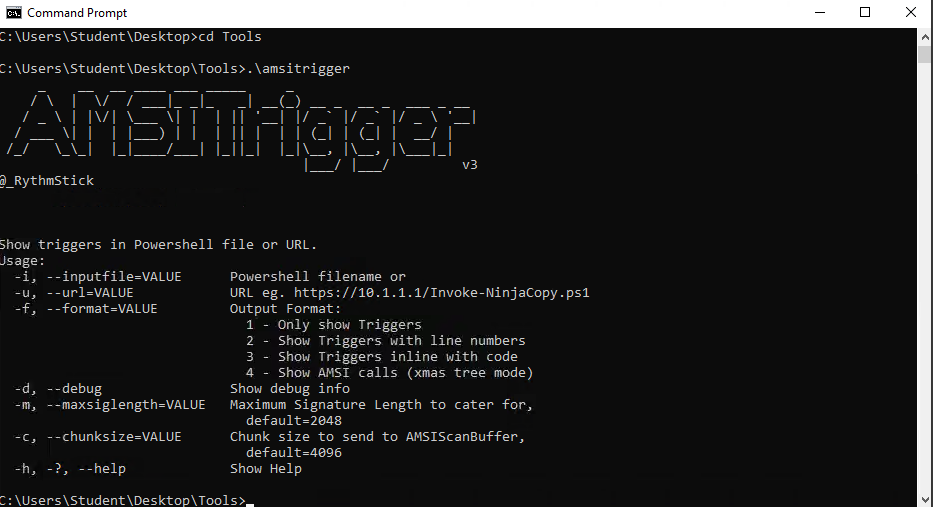
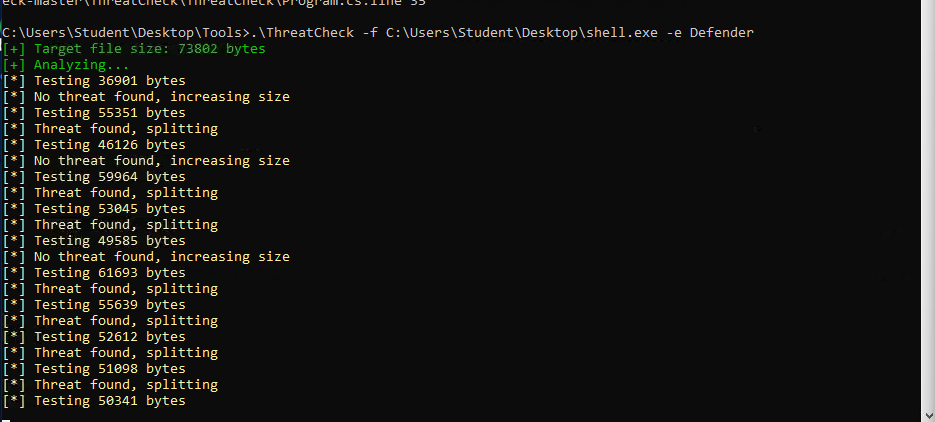
First, I move the “shell.exe” file to somewhere without an Exclusion, like the desktop. Then, I check for available tools on this machine. I see “amsitrigger” and “ThreatCheck”. I open both.
Automating Signature Identification
To speed up the process of locating signatures inside binaries, we can automate the splitting and scanning process instead of manually cutting a file and testing each chunk. On the Windows lab machine, a PowerShell script called Find-AVSignature is provided. This script recursively splits a binary over a given interval and saves the resulting files so they can be scanned by the antivirus engine. To use it, the script must first be dot-sourced into the PowerShell session and then executed.
The script will then prompt for parameters such as the starting byte, the ending byte, and the interval size. For example, setting the start to 0, the end to max, and the interval to 1000 will produce 1 KB chunks of the binary. These chunks are saved in C:\Users\TryHackMe\ and can be scanned individually to determine which range of bytes contains the signature. While this removes much of the manual work from the previous task, it is still limited because it only inspects strings dropped to disk rather than leveraging full antivirus scanning logic.
For more accurate results, the compiled tool ThreatCheck can be used. ThreatCheck is a fork of DefenderCheck that directly uses antivirus engines to analyze a file and report the offsets where bad bytes are located. It can be executed with the following syntax, pointing to a target file and selecting an engine:
or, to leverage the AMSI scanning engine:
The output provides the total file size, the location of the detected bytes, and a hex dump showing the exact region in which the suspicious code appears. This makes it much easier to identify the signature range compared to splitting manually or with Find-AVSignature.
For PowerShell scripts specifically, another tool called AMSITrigger is available. It works by sending portions of a script to AMSI and reporting the exact lines or sections that trigger alerts. It can be used with the following syntax:
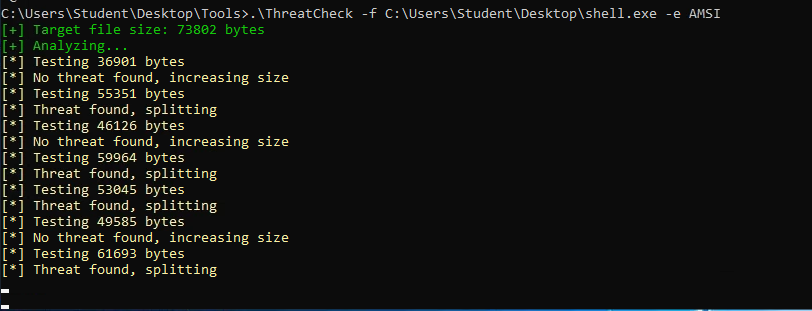 For Task 3’s challenge, if we change the value of -e from Defender to AMSI, we can eventually see the beginning of the bad bytes if we wait some time:
Eventually…
Static Code-Based Signatures
Once a troublesome static signature has been identified, the next step is to determine how to neutralize it without breaking the functionality of the program. Depending on the type and strength of the signature, it may be possible to handle it with simple obfuscation, or it may require a more targeted modification. The Layered Obfuscation Taxonomy organizes these approaches at the Obfuscating Methods and Obfuscating Classes layers. Techniques such as method proxy, method scattering/aggregation, and method clone fall under methods, while class hierarchy flattening, class splitting/coalescing, and dropping modifiers apply to classes.
When simplified, these techniques can be grouped into two broad categories. The first category involves splitting and merging objects, which is similar to concatenation. A function or class is broken down and rebuilt in pieces to ensure that the signature bytes no longer match, while still performing the same operation. A well-known example is the Covenant GetMessageFormat string, where the original string triggered detection:
This was refactored into a new class that builds the string piece by piece, effectively scattering the method:
Here the use of class splitting and method scattering creates a new, signature-safe implementation while maintaining identical output.
The second category is removing or obscuring identifiable information. This follows the same principle as renaming variables or stripping symbols but is applied specifically to flagged objects, methods, or classes. A case study can be found in Mimikatz, where the hardcoded string wdigest.dll was detected. Simply renaming or replacing this string across the codebase with randomized identifiers breaks the signature. This falls under the method proxy technique, since the flagged reference is replaced with a neutral one.
The PowerShell snippet below illustrates another common scenario where identifiable strings such as AmsiScanBuffer or module references like amsi.dll may be flagged. Obfuscation here requires modifying these values or splitting them into concatenated pieces so that the signature is no longer directly present, while keeping the logic intact.
Task Challenge
For this task, we are required to obfuscate the above Powershell Snippet using AmsiTrigger to visualize signatures.
Using a useful modification i found at DEF CON 27 Workshop Materials Page 62, I was able to get the flag as a popup.
Statistic Property-Based Signatures
When analysts or detection engines build hypotheses about a file, they do not rely exclusively on static signatures like strings. Instead, they may examine multiple file properties such as hash, entropy, author, filename, or metadata. These properties are often combined into rule sets like YARA or Sigma, which allow flexible detection beyond simple string matching. Some properties are trivial to manipulate, while others — particularly those tied to closed-source or signed binaries — can be much harder to alter without breaking functionality.
A file hash (checksum) is a unique identifier for a file and is frequently used to tag known malicious samples. Any change to the file’s content, even a single byte, will produce a new hash. If the source code is available, simply modifying and recompiling will produce a different hash. In the case of a signed or closed-source application, however, one must resort to bit-flipping. Bit-flipping iteratively flips individual bits in a binary until a variant is found that alters the hash while keeping the program functional. This can produce thousands of mutated versions, one of which may still verify with a valid certificate.
An example Python implementation of bit-flipping might look like this:
Once the variants are created, functionality must be verified. For example, if mutating msbuild.exe, one could loop through the flipped binaries with signtool to identify those that retain a valid signature: